
Battle of Votes
Pick your side, send gifts, and decide who wins!
Battle of Votes is an interactive game for TikTok LIVE. Your viewers control it with gifts, likes and comments while you stream.
- Platforms
- Web
- Format
- 1080×1920
Overview
Battle of Votes — Interactive Voting Game for TikTok LIVE
Turn your livestream into an exciting showdown with Battle of Votes, an interactive voting game for TikTok LIVE where viewers decide the winner by sending virtual gifts. Configure two avatars, represent each side with a distinct color, and let your audience choose the champion.
How does Battle of Votes work?
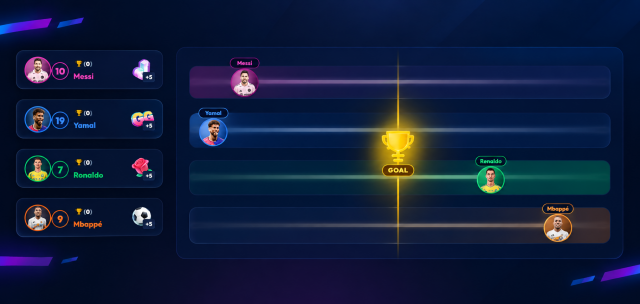
Set up the avatar for Side A and Side B using a simple configuration panel. Each side has specific gifts that add points to its voting tower. When viewers send gifts during the livestream, the corresponding side's score increases in real time, bringing it closer to the target needed to win.
Viewers can track both scores, compare the progress of the two sides, and support their favorite avatar. Every gift can shift the balance, making each vote more competitive and unpredictable.
Increase audience engagement and retention
Battle of Votes turns virtual gifts into a visual, interactive competition that encourages viewers to participate and follow the vote until the final result. With multilingual support and simple setup, it's ideal for popularity battles and boosting engagement during TikTok LIVE streams.
Features
- Voting battle between two avatars
- Simple and intuitive configuration panel
- Customizable Side A and Side B avatars
- Virtual gifts add points to each side
- Real-time scores and visual progress
- Configurable voting target
- Gift mapping for each team
- Multi-language support
- Visual interface with two competing sides
- Designed to increase viewer participation and retention